BIRD 实验 3 RIP动态路由3台机器
简介
本文紧接着上一个实验,描述进行BIRD 3台机器的RIP动态路由实验。
目标
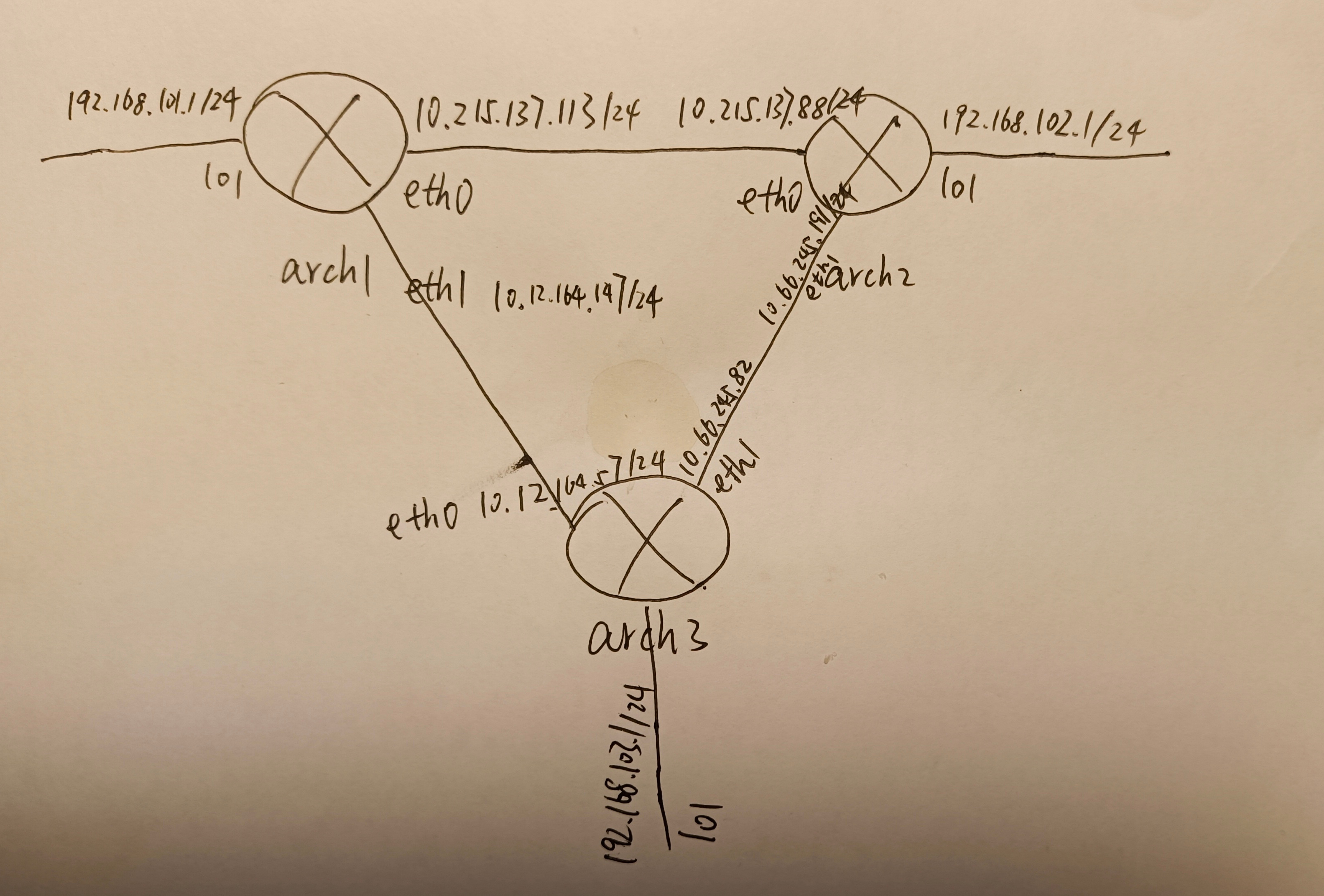
如图所示,这次三个路由器通过三个网桥直连,分别在lo1接口各挂一个子网,实验的目的是在一台路由器上能够ping通另一台路由器lo1接口上的子网。断开arch1和arch3之间的连接后,能自动切换到arch1-arch2-arch3的路由。
准备
参照实验2准备好arch1、arch2机、一个lxdbr0网桥。 参照实验2再添加一个arch3机。
再添加两个新网桥
lxc network create lxdbr1
lxc network create lxdbr2
看到新网桥如下:
lxc network list
+----------+----------+---------+-----------------+---------------------------+-------------+---------+---------+
|   NAME   |   TYPE   | MANAGED |      IPV4       |           IPV6            | DESCRIPTION | USED BY |  STATE  |
+----------+----------+---------+-----------------+---------------------------+-------------+---------+---------+
| enp3s0f0 | physical | NO      |                 |                           |             | 0       |         |
+----------+----------+---------+-----------------+---------------------------+-------------+---------+---------+
| lxdbr0   | bridge   | YES     | 10.215.137.1/24 | fd42:62ab:9b76:b227::1/64 |             | 3       | CREATED |
+----------+----------+---------+-----------------+---------------------------+-------------+---------+---------+
| lxdbr1   | bridge   | YES     | 10.12.164.1/24  | fd42:7d6a:5878:6514::1/64 |             | 0       | CREATED |
+----------+----------+---------+-----------------+---------------------------+-------------+---------+---------+
| lxdbr2   | bridge   | YES     | 10.66.245.1/24  | fd42:1416:4db6:ca04::1/64 |             | 0       | CREATED |
+----------+----------+---------+-----------------+---------------------------+-------------+---------+---------+
设置arch1、arch2机的第二个网卡
lxc config device add arch1 eth1 nic name=eth1 type=nic network=lxdbr1
lxc config device add arch2 eth1 nic name=eth1 type=nic network=lxdbr2
arch3机的这样设置
lxc config device add arch3 eth1 nic name=eth1 type=nic network=lxdbr2
lxc config device override arch3 eth0 name=eth0 network=lxdbr1 type=nic
还要为每台机器配置一下eth1网卡
新增 /etc/systemd/network/eth1.network
[Match]
Name=eth1

[Network]
DHCP=ipv4
配置好后三台机器设备配置长这个样子
$ lxc config device show arch1
eth1:
  name: eth1
  network: lxdbr1
  type: nic
$ lxc config device show arch2
eth1:
  name: eth1
  network: lxdbr2
  type: nic
$ lxc config device show arch3
eth0:
  name: eth0
  network: lxdbr1
  type: nic
eth1:
  name: eth1
  nictype: bridged
  parent: lxdbr2
  type: nic
lxc list长这个样子
$ lxc list
+-------+---------+-----------------------+-----------------------------------------------+-----------+-----------+
| NAME  |  STATE  |         IPV4          |                     IPV6                      |   TYPE    | SNAPSHOTS |
+-------+---------+-----------------------+-----------------------------------------------+-----------+-----------+
| arch1 | RUNNING | 192.168.101.1 (lo1)   | fd42:7d6a:5878:6514:216:3eff:fea6:6269 (eth1) | CONTAINER | 0         |
|       |         | 10.215.137.113 (eth0) | fd42:62ab:9b76:b227:216:3eff:fe87:c55f (eth0) |           |           |
|       |         | 10.12.164.147 (eth1)  |                                               |           |           |
+-------+---------+-----------------------+-----------------------------------------------+-----------+-----------+
| arch2 | RUNNING | 192.168.102.1 (lo1)   | fd42:62ab:9b76:b227:216:3eff:feed:52a9 (eth0) | CONTAINER | 0         |
|       |         | 10.66.245.191 (eth1)  | fd42:1416:4db6:ca04:216:3eff:fe39:1507 (eth1) |           |           |
|       |         | 10.215.137.88 (eth0)  |                                               |           |           |
+-------+---------+-----------------------+-----------------------------------------------+-----------+-----------+
| arch3 | RUNNING | 192.168.103.1 (lo1)   | fd42:7d6a:5878:6514:216:3eff:feaa:7aef (eth0) | CONTAINER | 0         |
|       |         | 10.66.245.82 (eth1)   | fd42:1416:4db6:ca04:216:3eff:fecc:2dc6 (eth1) |           |           |
|       |         | 10.12.164.157 (eth0)  |                                               |           |           |
+-------+---------+-----------------------+-----------------------------------------------+-----------+-----------+
实验
三台机器的/etc/bird.conf和实验2相比,完全不用变
在arch1、arch2 的/etc/bird.conf进行入如下配置,实际就是打开 protocol rip的注释
protocol device {
}

protocol direct {
    disabled;		# Disable by default
    ipv4;			# Connect to default IPv4 table
    ipv6;			# ... and to default IPv6 table
}

protocol kernel {
    ipv4 {			# Connect protocol to IPv4 table by channel
          export all;	# Export to protocol. default is export none
    };
}

protocol kernel {
    ipv6 { export all; };
}

protocol static {
    ipv4;			# Again, IPv4 channel with default options
    route 192.168.101.0/24 via 192.168.101.1;
}


protocol rip {
    ipv4 {
	    # Export direct, static routes and ones from RIP itself
	    import all;
	    export where source ~ [ RTS_DEVICE, RTS_STATIC, RTS_RIP ];
    };
    interface "eth*" {
      	update time 10;			# Default period is 30
	    timeout time 60;		# Default timeout is 180
	    authentication cryptographic;	# No authentication by default
	    password "hello" { algorithm hmac sha256; }; # Default is MD5
    };
}
实验结果,在arch1上,正常情况下
# ip route
default via 10.215.137.1 dev eth0 proto dhcp src 10.215.137.113 metric 1024
default via 10.12.164.1 dev eth1 proto dhcp src 10.12.164.147 metric 1024
10.12.164.0/24 dev eth1 proto kernel scope link src 10.12.164.147 metric 1024
10.12.164.1 dev eth1 proto dhcp scope link src 10.12.164.147 metric 1024
10.215.137.0/24 dev eth0 proto kernel scope link src 10.215.137.113 metric 1024
10.215.137.1 dev eth0 proto dhcp scope link src 10.215.137.113 metric 1024
192.168.101.0/24 dev lo1 proto kernel scope link src 192.168.101.1
192.168.101.0/24 via 192.168.101.1 dev lo1 proto bird metric 32
192.168.102.0/24 via 10.215.137.88 dev eth0 proto bird metric 32
192.168.103.0/24 via 10.12.164.157 dev eth1 proto bird metric 32

# ping 192.168.102.1
PING 192.168.102.1 (192.168.102.1) 56(84) bytes of data.
64 bytes from 192.168.102.1: icmp_seq=1 ttl=64 time=0.064 ms

# ping 192.168.103.1
PING 192.168.103.1 (192.168.103.1) 56(84) bytes of data.
64 bytes from 192.168.103.1: icmp_seq=1 ttl=64 time=0.061 ms
如上,说明arch1和arch2、arch3都是直连的。
模拟arch1和arch3间断掉
# ip link set eth1 down
再次检查
# ip route
default via 10.215.137.1 dev eth0 proto dhcp src 10.215.137.113 metric 1024
10.215.137.0/24 dev eth0 proto kernel scope link src 10.215.137.113 metric 1024
10.215.137.1 dev eth0 proto dhcp scope link src 10.215.137.113 metric 1024
192.168.101.0/24 dev lo1 proto kernel scope link src 192.168.101.1
192.168.101.0/24 via 192.168.101.1 dev lo1 proto bird metric 32
192.168.102.0/24 via 10.215.137.88 dev eth0 proto bird metric 32
192.168.103.0/24 via 10.215.137.88 dev eth0 proto bird metric 32

# ping 192.168.102.1
PING 192.168.102.1 (192.168.102.1) 56(84) bytes of data.
64 bytes from 192.168.102.1: icmp_seq=1 ttl=64 time=0.057 ms

ping 192.168.103.1
PING 192.168.103.1 (192.168.103.1) 56(84) bytes of data.
64 bytes from 192.168.103.1: icmp_seq=1 ttl=63 time=0.099 ms
如上,网络还是通的,路由变成arch1-arch2-arch3了。ping arch3的lo1所在网段时,ttl也变成63了,也说明多了一跳。实验成功。
总结
没有遇到啥难点,很快就成功了。小心default via 10.215.137.1那条路由,注意lxd自己也是一个路由器。
结束
实验结束,最后删除虚拟机。
lxc delete -f arch1
lxc delete -f arch2
lxc delete -f arch3
下次把三台机器互联的动态路由协议改为OSPF,实验能否成功。