BIRD 实验 7 BGP动态路由经由IPsec 虚拟专用网
简介
本文描述进行 一个经由IPsec 虚拟专用网的BGP动态路由实验。
目标
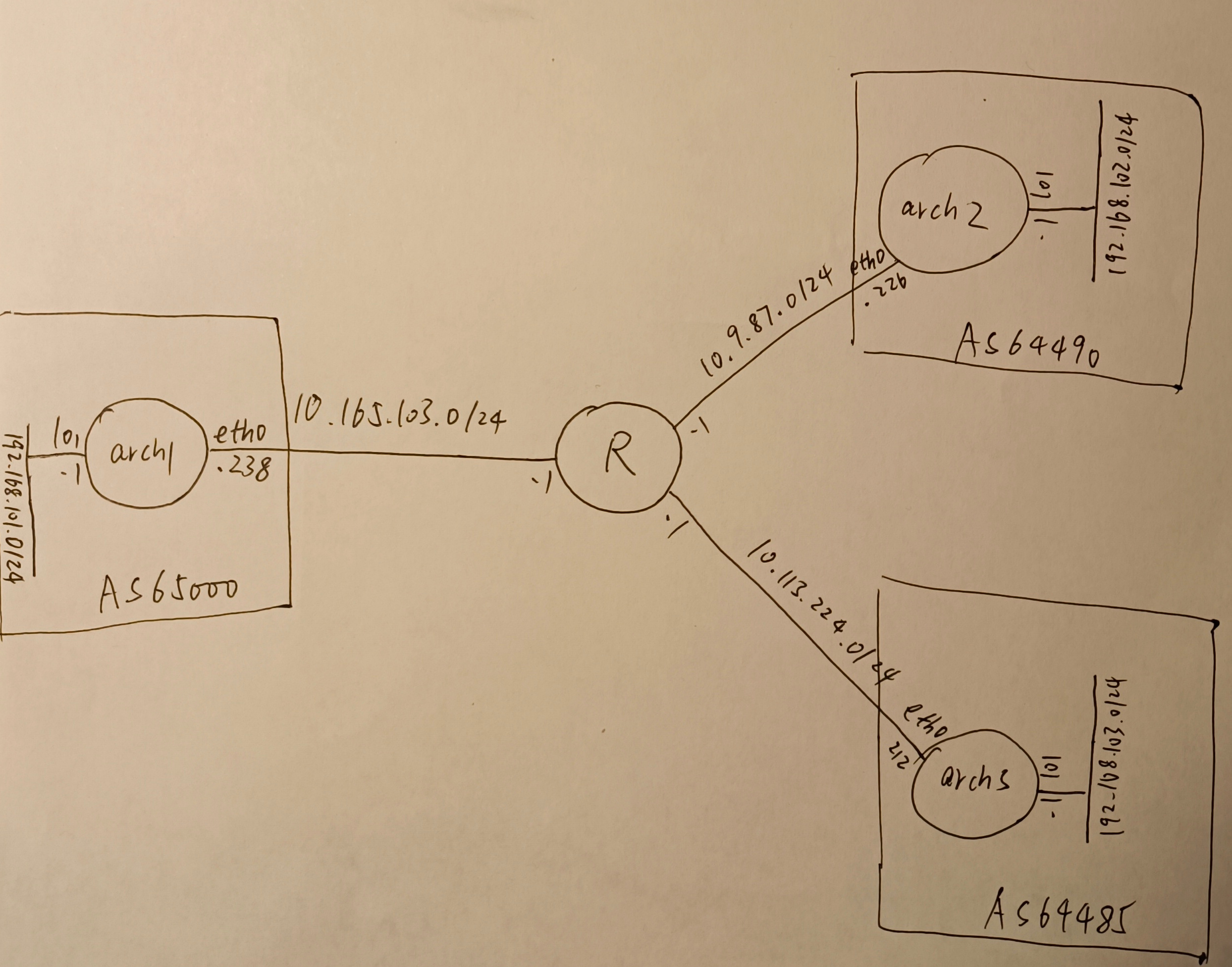
如图所示,3个AS星型互联,AS65000包含arch1,AS64490包含arch2,AS64485包含arch3。实验的目的是通过BGP协议动态交换路由,在arch1上能够ping通arch5上lo1接口上的子网。
这里中间的路由器R是利用LXD默认的路由功能做的,LXD创建的网桥默认都有一个IP地址为1结尾的网关,之间是互通的。
准备
IPsec 虚拟专用网我用的是strongSwan,版本是5.9.13。
PKI基础设施
# 保存好
pki --gen --type ed25519 --outform pem > strongswanKey.pem
# 拷贝到 arch1、arch2、arch3 /etc/swanctl/x509ca/ 下
pki --self --ca --lifetime 3653 --in strongswanKey.pem --dn "C=CH, O=strongSwan, CN=strongSwan Root CA" --outform pem > strongswanCert.pem

# 分别拷贝到 arch1、arch3、arch3 /etc/swanctl/private/ 下
pki --gen type ed25519 --outform pem > arch1Key.pem
pki --gen type ed25519 --outform pem > arch2Key.pem
pki --gen type ed25519 --outform pem > arch3Key.pem

# 临时文件
pki --req --type priv --in arch1Key.pem --dn "C=CH, O=strongswan, CN=arch1.strongswan.org" --san arch1.strongswan.org --outform pem > arch1Req.pem
pki --req --type priv --in arch2Key.pem --dn "C=CH, O=strongswan, CN=arch2.strongswan.org" --san arch2.strongswan.org --outform pem > arch2Req.pem
pki --req --type priv --in arch3Key.pem --dn "C=CH, O=strongswan, CN=arch3.strongswan.org" --san arch3.strongswan.org --outform pem > arch3Req.pem

# 分别拷贝到arch1、arch2、arch3 /etc/swanctl/x509/ 下
pki --issue --cacert strongswanCert.pem --cakey strongswanKey.pem --type pkcs10 --in arch1Req.pem --serial 01 --lifetime 1826 --outform pem > arch1Cert.pem
pki --issue --cacert strongswanCert.pem --cakey strongswanKey.pem --type pkcs10 --in arch2Req.pem --serial 01 --lifetime 1826 --outform pem > arch2Cert.pem
pki --issue --cacert strongswanCert.pem --cakey strongswanKey.pem --type pkcs10 --in arch3Req.pem --serial 01 --lifetime 1826 --outform pem > arch3Cert.pem
arch1机/etc/swanctl/swanctl.conf
include conf.d/*.conf

  connections {
    net-net {
      local {
        auth = pubkey
        certs = arch1Cert.pem
      }
      remote {
        auth = pubkey
      }
      children {
        net-net {
          local_ts  = 192.168.101.0/24,192.168.102.0/24,192.168.103.0/24
          remote_ts = 0.0.0.0/0
          start_action = trap
        }
      }
    }
  }
arch2机/etc/swanctl/swanctl.conf
include conf.d/*.conf

  connections {
    net-net {
      remote_addrs = arch1.strongswan.org
      local {
        auth = pubkey
        certs = arch2Cert.pem
      }
      remote {
        auth = pubkey
        id = "C=CH, O=strongSwan, CN=arch1.strongswan.org"
      }
      children {
        net-net {
          local_ts  = 192.168.102.0/24
          remote_ts = 192.168.101.0/24,192.168.103.0/24
          start_action = trap
        }
      }
    }
  }
arch3机/etc/swanctl/swanctl.conf
include conf.d/*.conf

  connections {
    net-net {
      remote_addrs = arch1.strongswan.org
      local {
        auth = pubkey
        certs = arch3Cert.pem
      }
      remote {
        auth = pubkey
        id = "C=CH, O=strongSwan, CN=arch1.strongswan.org"
      }
      children {
        net-net {
          local_ts  = 192.168.103.0/24
          remote_ts = 192.168.101.0/24,192.168.102.0/24
          start_action = trap
        }
      }
    }
  }
arch2、arch3机/etc/hosts
10.165.103.238 arch1.strongswan.org
10.9.87.226 arch2.strongswan.org
10.113.224.212 arch3.strongswan.org
IKEv2 IPsec 虚拟专用网就搭建好了,可以用ping -I 192.168.103.1 192.168.101.1等命令互相测试联通性。
LXD 网络列表
$ lxc network list
+--------+----------+---------+-----------------+---------------------------+-------------+---------+---------+
|  NAME  |   TYPE   | MANAGED |      IPV4       |           IPV6            | DESCRIPTION | USED BY |  STATE  |
+--------+----------+---------+-----------------+---------------------------+-------------+---------+---------+
| eth0   | physical | NO      |                 |                           |             | 0       |         |
+--------+----------+---------+-----------------+---------------------------+-------------+---------+---------+
| lxdbr0 | bridge   | YES     | 10.165.103.1/24 | fd42:a497:a975:8f4d::1/64 |             | 2       | CREATED |
+--------+----------+---------+-----------------+---------------------------+-------------+---------+---------+
| lxdbr1 | bridge   | YES     | 10.9.87.1/24    | fd42:9ec5:6315:437a::1/64 |             | 1       | CREATED |
+--------+----------+---------+-----------------+---------------------------+-------------+---------+---------+
| lxdbr2 | bridge   | YES     | 10.113.224.1/24 | fd42:cb1f:d526:a477::1/64 |             | 1       | CREATED |
+--------+----------+---------+-----------------+---------------------------+-------------+---------+---------+
LXD 主机列表
$ lxc list
+-------+---------+-----------------------+-----------------------------------------------+-----------+-----------+
| NAME  |  STATE  |         IPV4          |                     IPV6                      |   TYPE    | SNAPSHOTS |
+-------+---------+-----------------------+-----------------------------------------------+-----------+-----------+
| arch1 | RUNNING | 192.168.101.1 (lo1)   | fd42:a497:a975:8f4d:216:3eff:fef3:f1fb (eth0) | CONTAINER | 0         |
|       |         | 10.165.103.238 (eth0) |                                               |           |           |
+-------+---------+-----------------------+-----------------------------------------------+-----------+-----------+
| arch2 | RUNNING | 192.168.102.1 (lo1)   | fd42:9ec5:6315:437a:216:3eff:fe6f:4176 (eth0) | CONTAINER | 0         |
|       |         | 10.9.87.226 (eth0)    |                                               |           |           |
+-------+---------+-----------------------+-----------------------------------------------+-----------+-----------+
| arch3 | RUNNING | 192.168.103.1 (lo1)   | fd42:cb1f:d526:a477:216:3eff:feea:eb20 (eth0) | CONTAINER | 0         |
|       |         | 10.113.224.212 (eth0) |                                               |           |           |
+-------+---------+-----------------------+-----------------------------------------------+-----------+-----------+
实验
arch1机/etc/bird.conf
log syslog all;

protocol device {
}

protocol direct {
    disabled;		# Disable by default
    ipv4;			# Connect to default IPv4 table
    ipv6;			# ... and to default IPv6 table
}

protocol kernel {
    ipv4 {			# Connect protocol to IPv4 table by channel
          export all;	# Export to protocol. default is export none
    };
}

protocol kernel {
    ipv6 { export all; };
}

protocol static {
    ipv4;			# Again, IPv4 channel with default options
    route 192.168.101.0/24 via 192.168.101.1;
    route 192.168.102.1/32 via "lo1";
    route 192.168.103.1/32 via "lo1";
}

filter rt_import
{
    if bgp_path.first != 64496 then reject;
    if bgp_path.len > 64 then reject;
    if bgp_next_hop != from then reject;
    accept;
 }

protocol bgp uplink1 {
    local 192.168.101.1 as 65000;
    neighbor 192.168.102.1 as 64496;
    hold time 90;		# Default is 240
    password "secret";	# Password used for MD5 authentication
    multihop;

    ipv4 {			# regular IPv4 unicast (1/1)
	    import filter rt_import;
	    export where source ~ [ RTS_STATIC, RTS_BGP ];
    };
}

filter rt_import2
{
    if bgp_path.first != 64485 then reject;
    if bgp_path.len > 64 then reject;
    if bgp_next_hop != from then reject;
    accept;
 }
protocol bgp uplink2 {
    local 192.168.101.1 as 65000;
    neighbor 192.168.103.1 as 64485;
    hold time 90;		# Default is 240
    password "secret";	# Password used for MD5 authentication
    multihop;

    ipv4 {			# regular IPv4 unicast (1/1)
	    import filter rt_import2;
	    export where source ~ [ RTS_STATIC, RTS_BGP ];
    };
}
arch2机/etc/bird.conf
log syslog all;

protocol device {
}

protocol direct {
    disabled;		# Disable by default
    ipv4;			# Connect to default IPv4 table
    ipv6;			# ... and to default IPv6 table
}

protocol kernel {
    ipv4 {			# Connect protocol to IPv4 table by channel
          export all;	# Export to protocol. default is export none
    };
}

protocol kernel {
    ipv6 { export all; };
}

protocol static {
    ipv4;			# Again, IPv4 channel with default options
    route 192.168.102.0/24 via 192.168.102.1;
    route 192.168.101.1/32 via "lo1";
    route 192.168.103.1/32 via "lo1";
}

filter rt_import
{
    if bgp_path.first != 65000 then reject;
    if bgp_path.len > 64 then reject;
    if bgp_next_hop != from then reject;
    accept;
}

protocol bgp uplink1 {
    local 192.168.102.1 as 64496;
    neighbor 192.168.101.1 as 65000;
    hold time 90;		# Default is 240
    password "secret";	# Password used for MD5 authentication
    multihop;

    ipv4 {			# regular IPv4 unicast (1/1)
	    import filter rt_import;
	    export where source ~ [ RTS_STATIC, RTS_BGP ];
    };
}
arch3机/etc/bird.conf
log syslog all;

protocol device {
}

protocol direct {
    disabled;		# Disable by default
    ipv4;			# Connect to default IPv4 table
    ipv6;			# ... and to default IPv6 table
}

protocol kernel {
    ipv4 {			# Connect protocol to IPv4 table by channel
          export all;	# Export to protocol. default is export none
    };
}

protocol kernel {
    ipv6 { export all; };
}

protocol static {
    ipv4;			# Again, IPv4 channel with default options
    route 192.168.103.0/24 via 192.168.103.1;
    route 192.168.101.1/32 via "lo1";
    route 192.168.102.1/32 via "lo1";
}

filter rt_import
{
    if bgp_path.first != 65000 then reject;
    if bgp_path.len > 64 then reject;
    if bgp_next_hop != from then reject;
    accept;
}

protocol bgp uplink1 {
    local 192.168.103.1 as 64485;
    neighbor 192.168.101.1 as 65000;
    hold time 90;		# Default is 240
    password "secret";	# Password used for MD5 authentication
    multihop;

    ipv4 {			# regular IPv4 unicast (1/1)
	    import filter rt_import;
	    export where source ~ [ RTS_STATIC, RTS_BGP ];
    };
}
在arch3上验证
# ip route
default via 10.113.224.1 dev eth0 proto dhcp src 10.113.224.212 metric 1024
10.113.224.0/24 dev eth0 proto kernel scope link src 10.113.224.212 metric 1024
10.113.224.1 dev eth0 proto dhcp scope link src 10.113.224.212 metric 1024
192.168.102.1 dev lo1 proto bird scope link metric 32
192.168.103.0/24 dev lo1 proto kernel scope link src 192.168.103.1
192.168.103.0/24 via 192.168.103.1 dev lo1 proto bird metric 32
192.168.103.1 via 192.168.101.1 dev lo1 proto bird metric 32
# ping 192.168.102.1
PING 192.168.102.1 (192.168.102.1) 56(84) bytes of data.
64 bytes from 192.168.102.1: icmp_seq=1 ttl=63 time=0.155 ms
如上
192.168.101.0/24 via 192.168.101.1 dev lo1 proto bird metric 32
192.168.102.0/24 via 192.168.101.1 dev lo1 proto bird metric 32
这两条就是通过BGP动态交换得到的路由。
停止arch2机后,在arch3上验证
# ip route
default via 10.113.224.1 dev eth0 proto dhcp src 10.113.224.212 metric 1024
10.113.224.0/24 dev eth0 proto kernel scope link src 10.113.224.212 metric 1024
10.113.224.1 dev eth0 proto dhcp scope link src 10.113.224.212 metric 1024
192.168.101.0/24 via 192.168.101.1 dev lo1 proto bird metric 32
192.168.101.1 dev lo1 proto bird scope link metric 32
192.168.102.1 dev lo1 proto bird scope link metric 32
192.168.103.0/24 dev lo1 proto kernel scope link src 192.168.103.1
192.168.103.0/24 via 192.168.103.1 dev lo1 proto bird metric 32
192.168.103.1 via 192.168.101.1 dev lo1 proto bird metric 32

## ping 192.168.102.1不通了
# ping -I 192.168.103.1 192.168.102.1
PING 192.168.102.1 (192.168.102.1) from 192.168.103.1 : 56(84) bytes of data.
--- 192.168.102.1 ping statistics ---
3 packets transmitted, 0 received, 100% packet loss, time 2025ms

## ping 192.168.101.1还是通的
# ping -I 192.168.103.1 192.168.101.1
PING 192.168.101.1 (192.168.101.1) from 192.168.103.1 : 56(84) bytes of data.
64 bytes from 192.168.101.1: icmp_seq=1 ttl=64 time=0.111 ms
由此看到BGP路由可以在IPsec 虚拟专用网上进行动态交换,并且还是基于策略路由的虚拟专用网(无接口)。
实验成功。
总结
- 由于这次bgp服务器不是二层直连,
protocol bgp中multihop必不可少,否则TCP 179监听端口起不来 参见 https://bird-users.network.narkive.com/6UaUwLdF/seems-i-can-t-get-bird-to-open-a-bgp-listen-socket - 由于bgp服务器不是二层直连,还要在
protocol static中宣告对端的静态路由,不然会unreachable参见 https://www.reddit.com/r/networking/comments/qiq8pt/simple_bird_ibgp_config_doesnt_work/
以下是另一些关于IPsec 虚拟专用网的思考:
- 该IPsec 虚拟专用网方案是Hub-Spoke型的。arch1为Hub,arch2、arch3为Spoke。arch2、arch3之间是否能协商后直连(ADV 虚拟专用网),今后可再研究。
- 该IPsec 虚拟专用网方案是无接口的方案,能否替换为有接口的方案,今后可再研究。
- 该IPsec 虚拟专用网方案TS网段设置的过细,能否设置得更大,如
0.0.0.0/0,今后可再研究。 - 该IPsec 虚拟专用网方案应该很容易用Wireguard代替。因为Wireguard是有接口的,应该更容易设置路由。
结束
实验结束,最后删除虚拟机。
lxc delete -f arch1
lxc delete -f arch2
lxc delete -f arch3
下次该研究加入dn42了。